

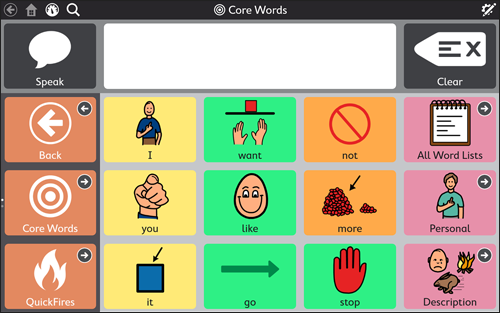
TD Snap is a suite of communication page sets from Tobii Dynavox. It is a software program that can be installed on any Windows 10 device such as a Surface Pro, and is also available in Tobii Dynavox's I-Series and I-110 communication devices. There is an iPad version. You can access TD Snap via a range of access methods including touch, switch, eye gaze and pointing devices. TD Snap offers a range of page sets for communication, with symbol or text-based options.
TD Snap includes Scottish Acapela voices, with one adult female voice and two child voices (one male and one female). To add the CereProc Scottish voices, follow the ‘How do I set up the Scottish Voices?’ steps below.
To support use of TD Snap in the classroom, Tobii Dynavox offers TD Snap for Schools which allows TD Snap to be installed on Windows devices. Teachers can register for a free license.
Tobii Dynavox also provide Pathways for Core First, which is a free tool with lesson plans and materials for teaching users how to use Snap Core.
Download a 60-day free trial
TD Snap can be downloaded for a 60-day free trial. Find out how to access the 60-day free trial in this support article:
How to start a free 60-day trial of TD Snap.
Once you have created a free MyTobiiDynavox account, log in and download the software with 60-day free trial using the following link:
Download TD Snap: 60-day free trial.
How do I set up the Scottish Voices?
- Go to the Download page and download and install the voice(s) on your device.
- Open Snap Core First and go to Edit > User > Speaking voice, scroll down to Windows voices and click on the voice you want to use.
- Adjust the speed and pitch to your preference.
Our social media sites - YouTube, Twitter and Facebook